1. Program Description
Fahren, operated by Kevin Ouellette doing business as Fahren (fahrensense.com), provides an environmental monitoring platform. This SMS program sends automated text message notifications from the Fahren platform to users who have opted in to receive them. Messages notify users about sensor alarm events including temperature threshold violations, humidity threshold violations, sensor disconnections, and power loss events.
2. How You Opt In
SMS consent is given directly by the account holder inside the Fahren mobile app. There is no other way to opt in - Fahren never adds a phone number on a user's behalf, and no one else can consent for you.
- Open the Fahren app and go to Settings > Notifications.
- Enter your own mobile phone number. Links to this SMS Terms page and our Privacy Policy are shown on this screen, before any consent is given.
- Turn on Enable SMS Alerts. A consent dialog appears with the full program disclosure. SMS is only enabled if you tap I Agree; tapping Cancel leaves the toggle off.
By tapping I Agree you expressly consent to receive automated text messages from Fahren at the phone number you provided. Consent is not a condition of purchase or use of any Fahren product or service, and you can turn SMS off at any time in the same screen.
Opt-In Screen
Consent is captured by this dialog in the Fahren mobile app, shown after the user enters their phone number and turns on Enable SMS Alerts in Settings > Notifications:
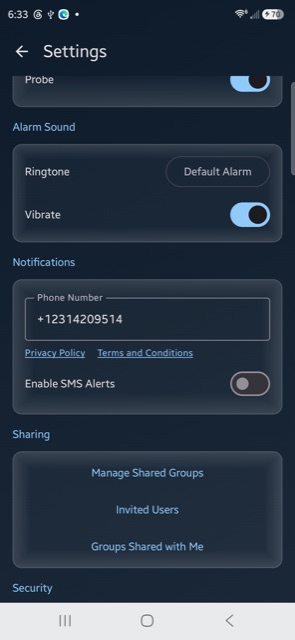
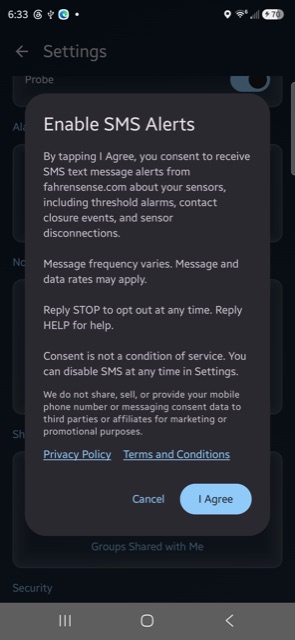
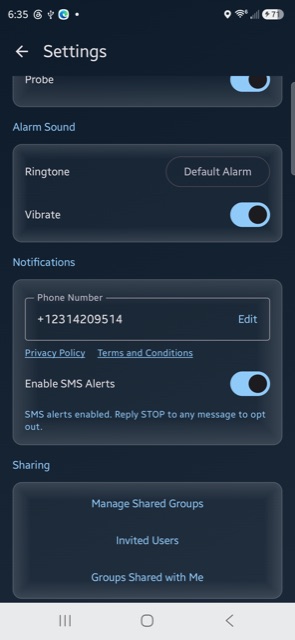
Screenshots taken from the Fahren mobile app, Settings > Notifications.
3. Message Types and Frequency
Fahren sends the following types of SMS messages:
- Temperature high/low alarm alerts
- Humidity high/low alarm alerts
- Sensor disconnection (no data received) alerts
- Power loss alerts (Pro sensors)
- Low battery alerts (Pro sensors)
Message frequency varies based on sensor activity and alarm configuration. Typical frequency is 1-10 messages per day, but may be higher during active alarm conditions.
Message and data rates may apply. Check with your mobile carrier for details about your messaging plan.
4. How to Opt Out
You can stop receiving SMS messages from Fahren at any time by:
- Reply STOP to any Fahren text message
- Remove your phone number from the Fahren app settings
- Contact us at kev.oue@gmail.com
After opting out, you will receive one final confirmation message. You will not receive any further SMS messages unless you opt in again.
5. How to Get Help
Reply HELP to any Fahren text message for assistance, or contact us at kev.oue@gmail.com.
6. Supported Carriers
Fahren SMS notifications are compatible with all major US carriers including AT&T, Verizon, T-Mobile, Sprint, and most regional carriers. Carriers are not liable for delayed or undelivered messages.
7. Privacy and Data Sharing
Your phone number is used solely to deliver Fahren alarm notifications. We do not use your phone number for marketing or promotional purposes.
No mobile information will be shared with third parties/affiliates for marketing/promotional purposes. Mobile opt-in data and consent will not be shared, sold, or rented to any third parties at any time.
For complete details on how we handle your data, see our Privacy Policy.
8. Changes to These Terms
We may update these SMS terms from time to time. Changes will be posted on this page with an updated date. Continued use of SMS notifications after changes constitutes acceptance.
9. Contact
Questions about our SMS program? Contact us at kev.oue@gmail.com.
Fahren — fahrensense.com